

SAP Internal Tables

Unlike database tables which are used for long term data storage, the internal tables are temporary tables created and used during the program execution, being deleted prior to the program being terminated. They are used for storing the dynamic data that it sets from a (subset of a) fixed structure in the main/working memory in ABAP.

In effect, internal tables act as arrays (or even better lists – as their size is actually not fixed) in ABAP and are the most complex data objects in ABAP environment. They are most often used for storing and formatting data from a database table within a program.

Internal tables are characterised by the following properties:

  • table type determines the access type that specifies how ABAP accesses the individual table rows
  • row type determines the column that is declared with any ABAP data type
  • uniqueness of the key specifies the key as unique or non-unique
  • key components specify the criteria based on which the table rows are identified

They are most often used as snapshots of database tables (of one or even several tables), or as containers for volatile data.
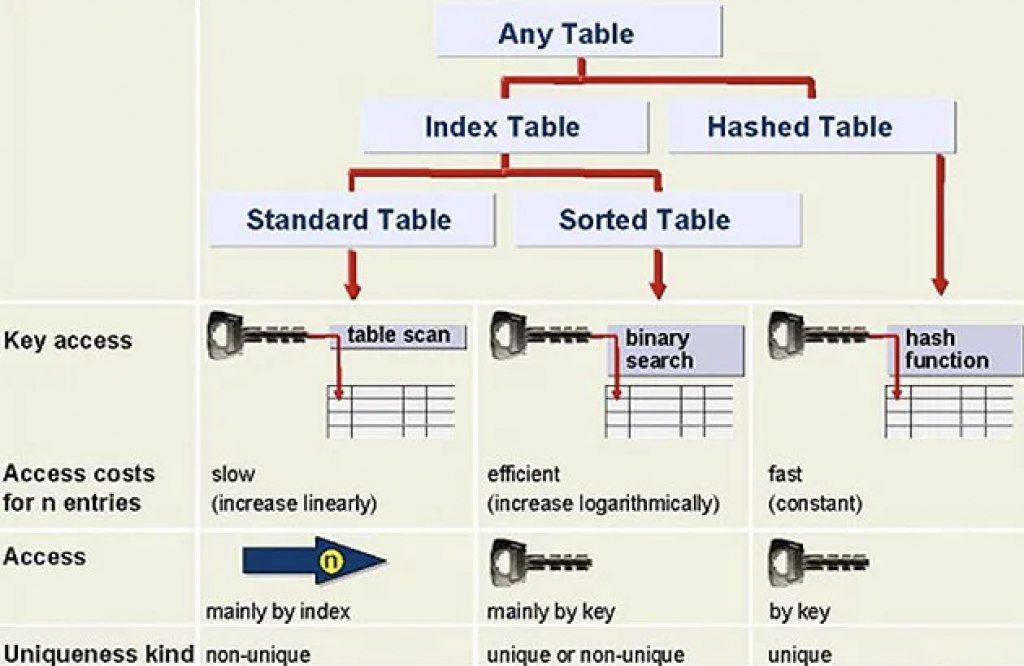
Diagram 1. Internal table types.

Internal Table Types

There are three types of internal tables in SAP ABAP programming:

  • standard internal tables
  • sorted internal tables
  • hashed internal tables
Standard Tables Sorted Tables Hashed Tables
These are default internal tables. These are a special type of internal tables, where data is automatically sorted when the record is inserted. These are used with logical databases.
It is an index table. It is an index table. It is NOT an index table.
Table has a non-unique key. Table has a unique key. Table key is unique and no duplicate entries are allowed.
Access by linear table index or key. Access by linear index or sort key. Direct access only by table key.
Either key or index operation used to read a record. Either key or index operation used to read a record. Key operation used to read the record. Index operation is not allowed.
Either linear search or binary search used to search for a record. Binary search used to search for a record. Hashed algorithm used to search for a record.
Data is not sorted by default and can use sort operation to sort the data. Data already sorted. Data already sorted.
Records can be inserted or appended. Records can be inserted. Used in ABAP with BI projects.
Response time proportional to table size. Response time logarithmically proportional to table size. Constant, fast response time.

Usage

Standard tables are most appropriate for general table operations. Accessed by referring to the table index (which is the quickest access method). Access time for standard table increases linearly with respect to the number of table entries. New rows are appended to the table. Individual rows are accessed by reading the table at a specified index value.

Sorted tables are most appropriate where the table is to be filled in sorted order. Sorted tables are filled using the INSERT statement. Inserted entries are sorted according to a sort sequence defined by the table key. Illegal entries are recognized as soon as you try to insert them into the table. Response time is logarithmically proportional to the number of table entries (since the system always uses a binary search). Sorted tables are particularly useful if you wish to process row by row using a LOOP.

Hashed tables are most appropriate when access to rows is performed by a key. Cannot access hashed tables via the table index. response time remains constant regardless of the number of rows in the table.

SAP Database Tables

There exist three types of SAP database tables: transparent tables, pool tables and cluster tables.

Transparent tables

Transparent tables are of the same structure both in dictionary as well as in the database itself, i.e. they both contain exactly the same fields and data. For that reason, one table in the data dictionary corresponds with exactly one table in the database (i.e. it is a one-to-one relationship).

These tables have at least one primary key, secondary indices can be created and they can be accessed both from within SAP ecosystem (using Open SQL) as well as outside of it using the database’s native SQL. They can be buffered, although that should be avoided in case of heavily updated tables.

Transparent tables are used to store master data, e.g. table of customers or a table of vendors. Examples of such tables are BKPF, VBAK, VBAP, KNA1, COEP, etc.

Pool Tables

Pool tables are logical tables that must be assigned to a table pool upon defining them, meaning that many tables appearing as distinct in ABAP dictionary are actually stored as one physical table within the database. This equates to a many-to-one relationship with the actual database table.

The table in the database has a different name than the tables in the DDIC, it has a different number of fields, and the fields have different names as well. Pooled tables are thus an SAP proprietary construct used to hold a large number (tens to thousands) of very small tables (about 10 to 100 rows each) in one specially constructed physical database table.

Pooled tables are primarily used by SAP to hold customizing data. Examples of SAP standard pooled tables include M_MTVMA, M_MTVMB, M_MTVMC, M_MTVMD, M_MTVME, M_MTVNF, M_MTVNG, M_MTVNH, M_MTVNI, M_MTVNJ, etc.

Cluster Tables

A cluster table is similar to a pooled table in the sense that it holds many tables within, but in this case those are cluster tables. It has a many-to-one relationship with a physical table in the database.

Cluster tables contain continuous text, for example, documentation. Several cluster tables can be combined to form a table cluster. Several logical lines of different tables are combined to form a physical record in this table type. This permits object-by-object storage or object-by-object access. In order to combine tables in clusters, at least parts of the keys must agree. Several cluster tables are stored in one corresponding table on the database.

Like pooled tables, cluster tables are another proprietary SAP construct. They are used to hold data from a few (approximately 2 to 10) very large tables. They would be used when these tables have a part of their primary keys in common, and if the data in these tables are all accessed simultaneously. Table clusters contain fewer tables than table pools and, unlike table pools, the primary key of each table within the table cluster begins with the same field or fields. Rows from the cluster tables are combined into a single row in the table cluster. The rows are combined based on the part of the primary key they have in common. Thus, when a row is read from any one of the tables in the cluster, all related rows in all cluster tables are also retrieved, but only a single I/O is needed.

A cluster is advantageous in the case where data is accessed from multiple tables simultaneously and those tables have at least one of their primary key fields in common. Cluster tables reduce the number of database reads and thereby improve performance.

Examples of cluster tables include BSEC (one-time account data document), BSED (bill of exchange fields document), BSEG (accounting document), BSES (document control data), BSET (tax data document), AUAA (settlement document – receiver), AUAB (settlement document – distribution), etc.

Restrictions on Pooled and Cluster Tables

Pooled and cluster tables are usually used only by SAP and not used by customers, probably because of the proprietary format of these tables within the database and because of technical restrictions placed upon their use within ABAP/4 programs. Restrictions on pooled and cluster tables include:

  • secondary indexes cannot be created
  • you cannot use the ABAP/4 constructs select distinct or group by
  • you cannot use native SQL
  • you cannot specify field names after the order by clause. order by primary key is the only permitted variation